
Choose the answers you need

Everything Correlta helps you get ahead of.

Use the modules that matter to you. Each one answers a different operational question. Together they help your team spot exposure, protect services, explain what changed and decide what needs attention next.

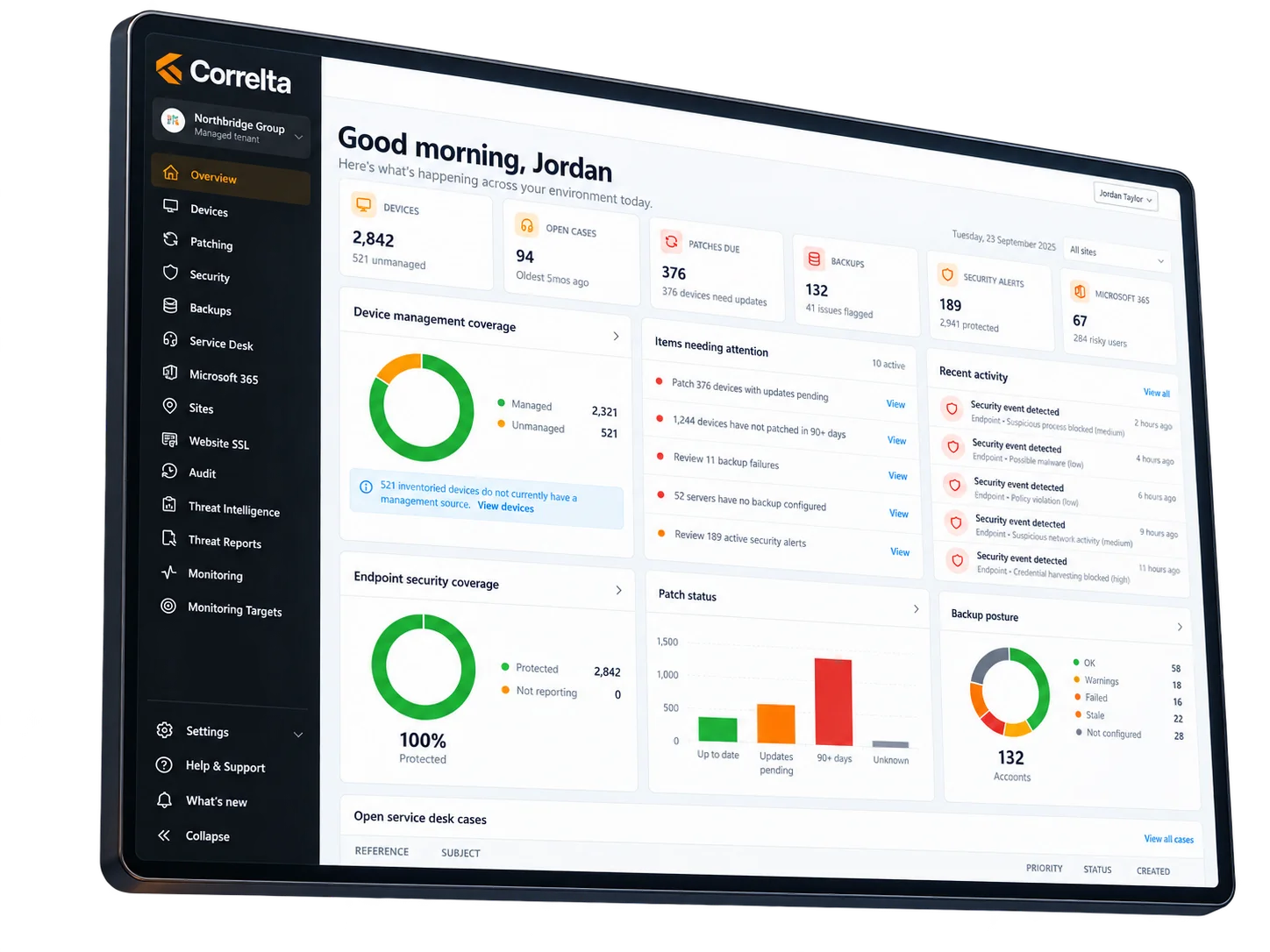
Correlta dashboard
Start with what matters today

Your estate works across connected people, devices and services.

A user problem can be an identity problem. A device problem can be a patching or security problem. A site issue can be monitoring, website or support. Correlta keeps those questions close enough together that your team can follow the problem instead of the product menu.

  • See what needs attention before opening the underlying specialist tool.
  • Keep the affected device, user, site and service context close to the issue.
  • Use only the modules you need and expand as your priorities change.
Know what you are responsible for

Answer “what have we got, who owns it and where are the gaps?” without rebuilding the estate first.

A trustworthy estate is the starting point for every patch, security, support and investment decision that follows.

Devices & Estate

Know what exists, who uses it and what needs a closer look.

Find the device you are responsible for, its user, location, operating system, hardware, storage, software, security and update context without piecing the asset story together from separate inventories.

People & Identity

Find risky, inactive and poorly protected accounts before access becomes the incident.

See the people behind the estate, their account state, activity, licences, linked devices and identity attention so orphaned access and weak protection are easier to spot.

Sites

See each location as an operating environment, not just an address.

Bring devices, monitoring, website, backup and site context together so you can tell whether a problem belongs to one machine, one location or something wider.

Microsoft 365

See identity, device and licence questions in the same conversation as the rest of IT.

Find enabled and inactive accounts, MFA and risk signals where available, managed-device attention and licence context without treating Microsoft 365 as a separate island.

Find exposure while there is still time to act

Turn patching, security and sharing noise into a queue your team can prioritise.

The value is knowing what deserves attention first, what is affected and what should happen next.

Patching

Fix the patching that matters before chasing the rest.

See overdue devices, missing critical updates, reboot requirements and stale patch evidence so the team can start with the machines carrying the clearest exposure.

Endpoint Security

Turn protection gaps and active alerts into a clear work queue.

See which endpoints need investigation, which alerts are critical, where protection is weak and which device or owner is affected before security noise becomes background wallpaper.

Microsoft 365 External Sharing

Know what has been shared outside your organisation — and who can still get to it.

Find public links, external recipients, edit access, no-expiry shares and the owners behind them so external sharing can be reviewed deliberately instead of discovered by accident.

Threat Intelligence

Turn vulnerability findings into work you can prioritise and explain.

Move from a long findings list to the affected systems, severity, follow-up and reporting evidence that helps the team decide what to remediate first.

Keep critical services working

Find failed protection, unavailable services and website problems before recovery becomes urgent.

Resilience is easier to manage when the warning arrives before the escalation.

Backups

Find failed, stale or uncertain protection before somebody asks for a restore.

See backup health, protection context and history clearly enough to follow up on warning signs while there is still time to correct them.

Monitoring

Know what is down, slow or stale before the phone rings.

See current availability, latency, incidents and site-side monitoring context so you can tell whether a problem is local, wider or simply missing fresh evidence.

Website Health

Catch availability, certificate and website security problems before visitors do.

Keep website reachability, certificate expiry and actionable findings on the same radar as the rest of the environment instead of waiting for a customer-facing failure.

Run a service you can explain and defend

Move reviews from “where did that number come from?” to “what are we going to do about it?”

Support work becomes more useful when current demand, priority, history and evidence can be followed without rebuilding the service story each time.

Helpdesk

See open work, priority, ownership and history without losing the wider context.

Follow the ticket story from request through comments, dates, ownership and linked context so triage and handover start with fewer missing pieces.

Service Reporting

Walk into service reviews with facts you can trace back to the work.

Understand demand, outstanding work, response and resolution performance, service risk and meaningful trends without creating a separate spreadsheet version of the truth.

Audit

Answer what changed, when and why without digging through every system.

Keep significant changes and supporting evidence available when an engineer, customer, auditor or leader needs the story behind a decision.

Customer Roadmap

Make improvement visible and give customers a clear way to influence what comes next.

Show what has shipped, what is being worked on and where customer votes matter, with product progress visible between update emails and meetings.

The advantage between the modules

A device problem rarely stays a device-only problem.

The real value appears when you can move from the issue to the affected person, site, patch state, security position, monitoring result or support case without starting the investigation again.

Show us one of your real questions →
Correlta overview interface
Start with the modules that solve today's problem

Start with the part of IT you want to improve first.

Tell us where your team loses time, gets surprised or struggles to prove the answer. We will show you the smallest useful Correlta starting point.